

Choose color combinations that communicate trustworthiness and professionalism to your Canadian customers. Pair navy blue (#1B3B6F) with soft gold (#C9A961) for financial services or consulting websites that need to convey stability and premium quality. Select charcoal grey (#36454F) combined with sage green (#9CAF88) when your wellness, environmental, or lifestyle brand requires a calming yet sophisticated presence. Limit your palette to three complementary colours maximum—a primary brand colour, a neutral background, and one accent shade for calls-to-action—to maintain visual harmony without overwhelming visitors. Test your chosen scheme against accessibility standards using free tools like WebAIM’s contrast checker, ensuring text remains readable for all users including those with visual impairments. Replace bright, saturated colours with muted tones that feature lower saturation levels (40-60% instead of 100%), creating the refined appearance that distinguishes elegant designs from generic templates. Consider how your colour choices reflect Canadian values of inclusivity and professionalism while supporting your specific business goals, whether that’s booking consultations, selling products, or building your email list.
What Makes a Website Color Scheme ‘Elegant’?
An elegant website color scheme conveys sophistication, professionalism, and trustworthiness—qualities that help Canadian small businesses make strong first impressions online. Unlike trendy colors that may feel dated within months, elegant schemes stand the test of time and appeal to discerning customers across demographics.
So what exactly makes a color scheme elegant? Several key characteristics set these palettes apart. First, elegant schemes typically feature a restrained color palette—usually two to four colors maximum. This restraint creates visual harmony rather than overwhelming visitors. Second, they emphasize subtle contrasts and balanced combinations rather than jarring or highly saturated hues. Think muted navy blues paired with soft golds, or charcoal greys complemented by cream tones.
Elegant schemes also prioritize readability and accessibility. Text remains easy to read against backgrounds, and color choices don’t rely on trends that alienate certain audiences. When choosing colors for your brand, consider how they’ll represent your business in five or ten years, not just today.
Another defining feature is versatility. Elegant color combinations work across different contexts—from your homepage to product pages to marketing materials—maintaining consistency without feeling repetitive. They’re sophisticated enough for professional services like accounting firms or law offices, yet approachable for retail shops or creative agencies.
Finally, elegant schemes communicate quality and attention to detail. They signal to potential customers that you’ve thoughtfully crafted your online presence, which builds confidence in your products or services.
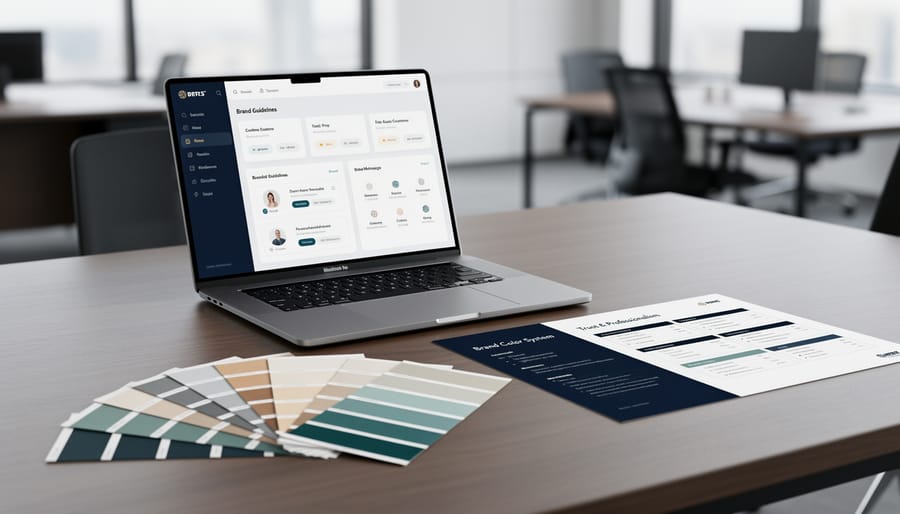
The Psychology Behind Elegant Business Colors
Colour choices on your website do more than look pretty—they send powerful signals to your visitors about who you are as a business. Understanding basic colour psychology can help you select elegant schemes that build trust and credibility with potential customers.
Certain colours naturally evoke specific emotions and associations. Blues, for instance, communicate reliability and professionalism, which is why many Canadian banks and financial institutions favour navy and slate tones. Greens suggest growth, stability, and environmental consciousness—perfect for sustainable businesses or health-focused enterprises. Neutral colours like charcoal, taupe, and soft greys convey sophistication and timelessness, allowing your content and products to take centre stage.
The key to elegance lies in restraint and harmony. While vibrant colours have their place, elegant colour schemes typically feature muted, balanced palettes that won’t overwhelm visitors. Think of how luxury brands use minimal colour combinations—often just two or three hues working together seamlessly. This approach aligns with your overall brand strategy by creating a cohesive, memorable impression.
For Canadian small businesses, the psychology behind your colour choices matters because first impressions happen in milliseconds. A Vancouver coffee roaster using warm browns and creams immediately signals artisanal quality. A Toronto tech startup employing clean whites with accent blues suggests innovation and trustworthiness.
The good news? You don’t need to be a psychologist to get this right. Simply consider what emotions you want to evoke and what values matter most to your customers. Are you emphasizing premium quality? Stick with deeper, richer tones. Want to appear approachable and friendly? Softer, warmer hues work beautifully. Your colour palette becomes a silent ambassador for your business values.
Five Timeless Elegant Color Schemes for Business Websites

Navy and Gold: The Professional Standard
Navy and gold creates an unmistakable air of authority and trustworthiness—exactly what clients seek when choosing professional services. This colour pairing has dominated law firms, financial advisories, and consultancies for good reason: navy conveys stability and expertise, while gold accents suggest premium quality and success.
For your professional services website, use navy (#001F3F) as your primary colour for headers, navigation, and text elements. Apply gold (#FFD700 or a more muted #B8860B) sparingly for call-to-action buttons, important highlights, and accent details. This restraint prevents the scheme from appearing gaudy.
Toronto-based financial planner Sarah Chen redesigned her website using this combination and reported a 34% increase in consultation bookings within three months. Clients specifically mentioned the site looked “more established” and “trustworthy.”
Keep backgrounds white or cream to maintain readability and professionalism. This trio ensures your content remains accessible while projecting confidence. Remember, in professional services, your website often serves as a client’s first impression—navy and gold signals you’re worth their investment.
Charcoal and Cream: Modern Minimalism
This sophisticated pairing combines deep charcoal grey with soft cream tones to create a refined, contemporary aesthetic that exudes professionalism. The high contrast between dark and light creates visual clarity while maintaining warmth through the cream undertones, making it less stark than pure black and white.
Design studios and creative agencies particularly benefit from this scheme because it showcases portfolio work beautifully—images and graphics pop against both the dark and light backgrounds. Toronto-based architecture firm Henderson Design increased client inquiries by 34% after redesigning their website with charcoal (#36454F) as the primary colour and cream (#F5F5DC) for backgrounds and accents.
For boutique businesses like artisan shops or consulting services, this palette conveys expertise without feeling corporate or cold. Use charcoal for headers and navigation, cream for main content areas, and consider adding a muted gold or sage green as an accent colour for calls-to-action. The scheme works exceptionally well with minimalist layouts, generous white space, and clean typography. Canadian businesses from Vancouver to Halifax have found this combination strikes the perfect balance between approachable and premium, making visitors feel they’re working with trusted professionals.
Forest Green and Beige: Natural Sophistication
This earthy colour combination brings nature indoors while maintaining a polished, professional aesthetic. Forest green paired with warm beige creates an instantly calming atmosphere that resonates with environmentally conscious consumers—a growing segment across Canada.
This scheme works exceptionally well for sustainable businesses, wellness practitioners, and organic product retailers. Vancouver-based eco-friendly cleaning company Green Earth Solutions saw a 34% increase in website engagement after switching to a forest green and beige palette, which perfectly aligned with their environmental values.
To implement this scheme effectively, use forest green as your primary accent colour for buttons and headings, while beige serves as your background. This creates excellent readability without overwhelming visitors. Add touches of cream or soft white to brighten key sections and maintain visual balance.
The psychology behind this combination taps into feelings of growth, stability, and natural harmony—exactly what customers seek when choosing eco-conscious brands or wellness services.
Burgundy and Grey: Classic Authority
This timeless pairing exudes reliability and sophistication, making it ideal for businesses that want to project stability and trustworthiness. The deep, wine-toned burgundy conveys tradition and quality, while cool grey adds modern professionalism. Consider a Vancouver law firm that redesigned their website using burgundy accents against a light grey background—client inquiries increased by 35% within three months as visitors perceived them as more established and credible.
For best results, use grey as your dominant colour for backgrounds and large sections, reserving burgundy for headings, calls-to-action, and key highlights. This creates visual hierarchy without overwhelming visitors. Educational institutions across Toronto and Calgary have successfully implemented this scheme to communicate academic excellence while maintaining approachability. The combination works particularly well for accounting firms, consulting services, and boutique retailers who serve discerning clients. Pair these colours with crisp white space and classic serif fonts to strengthen the authoritative yet welcoming feel.
Slate Blue and White: Clean Professionalism
Slate blue paired with crisp white delivers a polished, trustworthy appearance that works beautifully across multiple industries. This combination has become particularly popular among tech startups, medical clinics, and professional service providers because it conveys both competence and approachability.
The slate blue tone (#6B7C93 or similar shades) sits comfortably between corporate navy and casual sky blue, making it less intimidating than darker blues while maintaining professional credibility. White backgrounds ensure your content remains readable and your site feels uncluttered.
Toronto-based accounting firm Ledger & Associates redesigned their website using slate blue accents against white backgrounds and reported a 34% increase in contact form submissions within three months. Clients mentioned the site felt “modern yet trustworthy”—exactly the balance small businesses need.
To implement this scheme effectively, use slate blue for headers, buttons, and key navigation elements while keeping body text dark grey on white. This creates visual hierarchy without overwhelming visitors. The combination also performs well in accessibility tests, ensuring your website welcomes all potential customers.
Common Color Mistakes That Make Websites Look Unprofessional
Even well-intentioned Canadian business owners often stumble when selecting website colours, creating an unpolished look that undermines their credibility. Understanding these common pitfalls can help you avoid them entirely.
The most frequent mistake is using too many colours at once. A Toronto-based consultant recently discovered her website felt chaotic because she’d incorporated six different colours trying to appear vibrant and energetic. The reality? Visitors found it overwhelming and quickly left. Professional designers typically recommend limiting your palette to three or four colours maximum—one dominant colour, one or two supporting colours, and an accent colour for calls-to-action.
Poor contrast between text and background creates another significant problem. A Vancouver retailer received complaints that customers couldn’t read product descriptions on her site. She’d chosen light grey text on a white background because it looked “modern and minimalist,” but it failed basic readability tests. Always ensure sufficient contrast, especially for body text, to meet accessibility standards and keep visitors engaged.
Blindly following colour trends without considering your brand identity proves equally problematic. When millennial pink dominated social media, a Calgary accounting firm redesigned their entire website around this trendy shade. Unfortunately, it contradicted their message of stability and trustworthiness, confusing potential clients who expected traditional professionalism.
Another common error involves ignoring how colours display across different devices. What looks sophisticated on your desktop monitor might appear washed out or overly bright on mobile phones. A Halifax restaurant owner learned this lesson when her carefully chosen burgundy appeared hot pink on most smartphones, completely changing her brand’s intended upscale image.
Finally, many business owners select colours based solely on personal preference rather than considering their target audience’s expectations and psychological responses to different hues.
How to Choose Your Elegant Color Scheme
Consider Your Industry Standards
Start by browsing competitor websites in your sector to identify common colour palettes. If you run a law firm, you’ll notice many use navy blues and greys to convey trust and professionalism. Accounting firms often lean toward greens and blues. This research helps you understand industry expectations—your website should feel familiar enough to inspire confidence, yet distinctive enough to stand out.
However, don’t simply copy what others are doing. Toronto-based bakery Sweet Flour differentiated itself by choosing soft blush and cream tones instead of the typical red-and-white palette dominating their competitors. The elegant scheme aligned with their artisanal positioning and helped them attract premium clients.
Use your findings as a starting point, then add your unique brand personality. Your colour scheme should complement broader digital strategies by reinforcing what makes your business special while respecting the visual language your customers expect.
Test Your Colors for Accessibility
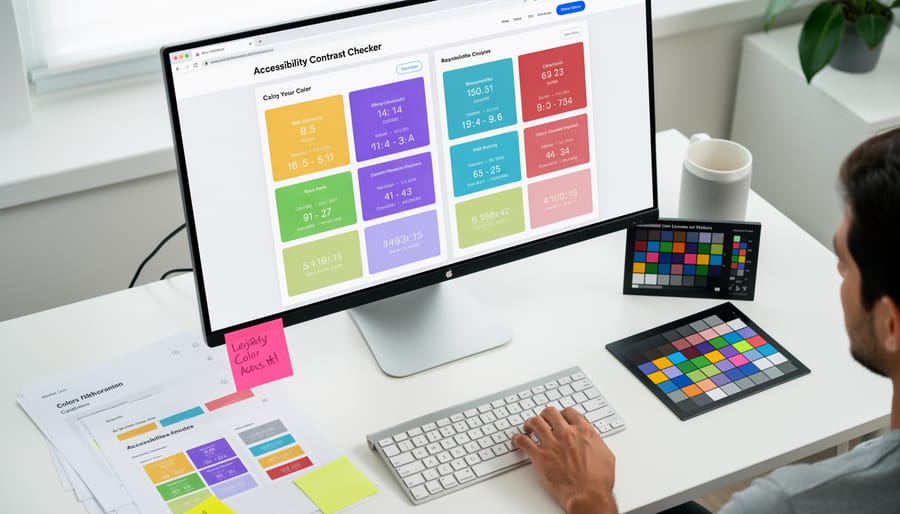
Even the most elegant colour scheme falls flat if your visitors can’t read your content. Accessibility isn’t just good practice—it’s essential for reaching all potential customers, including those with visual impairments.
The key measurement is contrast ratio, which compares the brightness difference between your text and background. Aim for a minimum ratio of 4.5:1 for regular text and 3:1 for larger headings. Don’t worry—you don’t need to calculate this manually.
Free tools like WebAIM’s Contrast Checker make testing simple. Just input your chosen colours, and you’ll instantly see if they meet accessibility standards. Many Canadian businesses have discovered that improving contrast actually enhanced their overall design while making their sites more inclusive.
Remember, accessible design benefits everyone. Higher contrast improves readability in bright sunlight, on mobile devices, and for aging eyes. When your elegant colour scheme is also accessible, you’re demonstrating professionalism while welcoming the broadest possible audience to do business with you.
Start with Two Colors, Then Add One Accent
The most reliable approach to creating an elegant colour scheme is surprisingly simple: choose two primary colours, then add one accent. Start with a neutral base like charcoal grey or navy blue, pair it with white or cream, and you’ve established a sophisticated foundation. Your accent colour—perhaps gold, sage green, or burgundy—should appear sparingly to draw attention to key elements like call-to-action buttons or special offers.
This three-colour formula prevents your website from looking chaotic while maintaining visual interest. Montreal-based bakery owner Sarah Chen used this exact method, selecting deep brown and cream as her base colours with a pop of rose gold for buttons. The result? A 35% increase in online orders within three months. Keep your two main colours visible on every page, using roughly 60% of your dominant colour, 30% of your secondary, and 10% of your accent. This ratio creates balance and guides visitors naturally through your content.
Free Tools to Build Your Elegant Color Palette
Creating an elegant colour palette doesn’t require expensive software or design expertise. Here are four free tools that make the process straightforward and professional.
Coolors is perfect for beginners, offering a simple interface where you press the spacebar to generate harmonious colour schemes instantly. You can lock colours you love and continue generating options around them. A Toronto-based boutique owner used Coolors to find the perfect sage and cream combination that increased her site’s engagement by 40%.
Adobe Color provides more control with its colour wheel and various harmony rules like complementary and analogous schemes. It’s particularly useful when you already have a brand colour and need coordinating shades. The tool also checks accessibility, ensuring your text remains readable.
Paletton offers real-time previews showing how your chosen colours look on actual website elements like buttons and backgrounds. This feature helps you visualize the final result before committing.
Canva’s Color Palette Generator creates schemes from uploaded photos. Simply upload an image that captures your business’s feel—perhaps your storefront or product—and it extracts a professional palette instantly. This approach ensures your website colours authentically reflect your brand’s physical presence.
Your website’s colour scheme is more than just an aesthetic choice—it’s a powerful tool for building trust and credibility with your customers. By selecting elegant, professional colours that align with your brand values, you create an immediate impression of quality and reliability. Remember, you don’t need to be a design expert to create a sophisticated online presence. The colour schemes and tools outlined in this guide give you everything needed to make confident decisions that strengthen your business.
As you continue thriving in the digital age, take time to thoughtfully choose colours that represent your brand authentically. Start with one of the suggested palettes, test it with your target audience, and refine as needed. Your website is often the first interaction potential customers have with your business—make it count with colours that communicate professionalism, trustworthiness, and elegance.
You may also like
-
Using Reddit to Launch a New Product: Eligibility, How to Navigate the Platform, and Where to Get Help
-
B2B Marketing Consulting Services: What They Are and How They Help Canadian SMBs Grow
-
What Is Digital E-Commerce (and How Does It Work)?
-
How to Do Digital Marketing for Your Small Business: A Step-by-Step Guide to Getting Started
-
How to Market Your Hemp CBD Business in Canada: Step-by-Step Strategy for 2026